Origo API
Documentation was generated on 2026-08-21T16:07:03.288Z
Table of contents
Http endpoints
admin
ai
app
auth
- * to /auth/logout
- GET to /auth/active-sessions
- GET to /auth/token-to-cookie
- POST to /auth/app
- POST to /auth/cookie
- POST to /auth/cookie/sms
- POST to /auth/disable-tfa/sms
- POST to /auth/enable-tfa/sms
- POST to /auth/refresh
- POST to /auth/sms
- POST to /auth/sms/send-code
- POST to /auth/token
- POST to /auth/token/sms
- POST to /auth/verify-tfa/sms
- POST to /auth/web
booked-consultant-ids
candidate-account
- DELETE to /candidate-account/:candidateId/contract
- GET to /candidate-account
- GET to /candidate-account/:userId
- GET to /candidate-account/:userId/history
- POST to /candidate-account
- POST to /candidate-account/:id/send-contract
- POST to /candidate-account/:userId/message
- POST to /candidate-account/bulk/message
- PUT to /candidate-account/:userId
- PUT to /candidate-account/:userId/recruit
- PUT to /candidate-account/:userId/recruitment
- PUT to /candidate-account/bulk/recruitment
collective-agreement
consultant
consultant-account
- DELETE to /consultant-account/:consultantId/contract
- DELETE to /consultant-account/:userId/absence/:absenceId
- DELETE to /consultant-account/:userId/block
- DELETE to /consultant-account/:userId/rating/:ratingId
- GET to /consultant-account
- GET to /consultant-account/:consultantId/salary
- GET to /consultant-account/:userId
- GET to /consultant-account/:userId/absence
- GET to /consultant-account/:userId/block
- GET to /consultant-account/:userId/generate-presentation
- GET to /consultant-account/:userId/history
- POST to /consultant-account
- POST to /consultant-account/:id/send-contract
- POST to /consultant-account/:userId/absence
- POST to /consultant-account/:userId/block
- POST to /consultant-account/:userId/rating
- POST to /consultant-account/message
- PUT to /consultant-account/:userId
- PUT to /consultant-account/:userId/absence/:absenceId
- PUT to /consultant-account/:userId/active
- PUT to /consultant-account/:userId/inactive
- PUT to /consultant-account/:userId/password
consultant-account-sync-version
consultant_rating
contract
- DELETE to /contract/:contractId
- DELETE to /contract/:contractId/ob-rule/:ruleId
- GET to /contract
- GET to /contract/:contractId
- GET to /contract/:contractId/ob-rule
- POST to /contract
- POST to /contract/:contractId/ob-rule
- PUT to /contract/:contractId
- PUT to /contract/:contractId/ob-rule
- PUT to /contract/:contractId/ob-rule/:ruleId
contract-signed-callback
corporate-group
customer
- DELETE to /customer/:customerId
- GET to /customer
- GET to /customer/:customerId
- GET to /customer/:customerId/competences
- GET to /customer/:customerId/history
- GET to /customer/:customerId/terms
- GET to /customer/:customerId/user
- GET to /customer/:id/duplicates
- GET to /customer/job/shifts_count
- POST to /customer
- POST to /customer/:customerId/price
- PUT to /customer/:customerId
customer-account
customer-sync-version
dashboard
dev
document
file-service
fortnox
integration
internal-notification
invitation
invoice
invoice-batch
job
- DELETE to /job/:jobId
- DELETE to /job/:jobId/application/:applicationId
- DELETE to /job/:jobId/invitation/:invitationId
- GET to /job
- GET to /job/:jobId
- GET to /job/:jobId/application
- GET to /job/:jobId/confirmation/consultant/:consultantId
- GET to /job/:jobId/confirmation/customer
- GET to /job/:jobId/history
- GET to /job/:jobId/shift
- GET to /job/:jobId/user
- POST to /job
- POST to /job/:jobId/application
- POST to /job/:jobId/book
- POST to /job/:jobId/cancel
- POST to /job/:jobId/deny
- POST to /job/:jobId/invitation
- POST to /job/:jobId/invitation/:invitationId/accept
- POST to /job/:jobId/invitation/:invitationId/decline
- POST to /job/:jobId/reopen
- POST to /job/:jobId/send-notification-to-matches
- POST to /job/:jobId/shift
- POST to /job/draft/user
- PUT to /job/:jobId
- PUT to /job/:jobId/application/:applicationId
- PUT to /job/:jobId/shift
- PUT to /job/:jobId/shifts
- PUT to /job/:jobId/shift_status
job-report
job-updater-agent
knowledge-base-article
knowledge-base-articles
me
message-template
notification
notifications
org-query-agent
organisation
- DELETE to /organisation/:orgId
- DELETE to /organisation/:orgId/tag-type/:taxonomy/:key
- GET to /organisation
- GET to /organisation/:orgId
- GET to /organisation/:orgId/competences
- GET to /organisation/:orgId/notification-settings
- GET to /organisation/:orgId/notification-templates
- POST to /organisation
- POST to /organisation/:orgId/tag-type/:taxonomy
- POST to /organisation/:orgId/template
- POST to /organisation/:orgId/template/:templateId/test
- PUT to /organisation/:orgId
- PUT to /organisation/:orgId/competence
- PUT to /organisation/:orgId/tag-type/:taxonomy/:key
- PUT to /organisation/:orgId/template/:id
organisation-account
origo
ping
rating
report
reset-password
salary-batch
schedule
stats
subsidiary
time-report
user
- DELETE to /user/:userId
- GET to /user/:userId/application
- GET to /user/:userId/contact-summary
- GET to /user/:userId/document
- GET to /user/:userId/job
- GET to /user/:userId/last_activity
- GET to /user/:userId/shift
- POST to /user/message
- POST to /user/resend-verification/:email
- POST to /user/verify/:tokenId
- PUT to /user/update-password
Service endpoints
auth-service
- auth-service.decode-token
- auth-service.generate-jwt-token-for-user.app
- auth-service.generate-jwt-token-for-user.cookie
- auth-service.generate-jwt-token-for-user.token
- auth-service.generate-jwt-token-for-user.web
- auth-service.get-session-details-by-user-id
- auth-service.logout-users-by-id
- auth-service.refresh-token
file-service
fruster-web-bus
mail-service
oo-fortnox-service
oo-hogia-hr-service
oo-job-service
- oo-job-service.archive
- oo-job-service.consultant-salary
- oo-job-service.create-job-reports
- oo-job-service.doctor
- oo-job-service.get-active-jobs
- oo-job-service.get-applications-by-user
- oo-job-service.get-booked-shifts-by-consultants
- oo-job-service.get-invoice-batch
- oo-job-service.get-jobs-by-query
- oo-job-service.get-requirement-tag-usage
- oo-job-service.get-salary-batch
- oo-job-service.get-salary-preview
- oo-job-service.get-shifts-by-user
- oo-job-service.get-time-reports-by-query
- oo-job-service.send-shift-finished-notification
- oo-job-service.send-shift-start-reminder
- oo-job-service.send-time_report-reminder-notification
- oo-job-service.silent-attest
- oo-job-service.strip-job-tag
- oo-job-service.strip-requirement-tag
- oo-job-service.timeout-invitations
- oo-job-service.update-job
oo-notification-service
oo-organisation-service
- oo-organisation-service.add-customer-history
- oo-organisation-service.get-contract-by-id
- oo-organisation-service.get-customer-by-id
- oo-organisation-service.get-customers-by-query
- oo-organisation-service.get-ob-dates
- oo-organisation-service.get-ob-dates-by-contracts
- oo-organisation-service.get-organisation-by-id
- oo-organisation-service.get-organisations-by-query
- oo-organisation-service.get-price
- oo-organisation-service.get-prices-by-contracts
- oo-organisation-service.get-subsidiary-by-id
- oo-organisation-service.getObRulesByContracts
oo-report-service
oo-user-log-service
oo-user-service
- oo-user-service.archive
- oo-user-service.bulk-invite-users
- oo-user-service.create-customer-account
- oo-user-service.get-all-blocked-consultants
- oo-user-service.get-auth-user
- oo-user-service.get-block-consultants
- oo-user-service.get-block-customers
- oo-user-service.get-collective-agreement-by-id
- oo-user-service.get-collective-agreements
- oo-user-service.get-consultants-by-collective-agreement
- oo-user-service.get-consultants-by-query
- oo-user-service.get-ratings
- oo-user-service.remove-expired-consultant-tags
- oo-user-service.send-certification-expiry-reminders
- oo-user-service.send-set-password-mail
- oo-user-service.strip-consultant-tag
- oo-user-service.update-consultant
- oo-user-service.update-consultant-location
- oo-user-service.update-search-text
password-reset-service
push-service
report-service
schedule-service
sms-auth-service
sms-service
sse
user-service
- user-service.add-roles
- user-service.availability-reminder
- user-service.create-user
- user-service.delete-user
- user-service.delete-users-by-query
- user-service.get-by-aggregate
- user-service.get-scopes
- user-service.get-user
- user-service.get-users-by-aggregate
- user-service.get-users-by-query
- user-service.remove-roles
- user-service.resend-verification
- user-service.set-password
- user-service.update-password
- user-service.update-user
- user-service.validate-password
- user-service.verify-email
Http endpoints
admin
DELETE to /admin/system/role/scope
from oo-fruster-user-service.ed91b8f9Removes one or more scopes from a system role.
DELETE to /admin/user/:id
from oo-fruster-user-service.ed91b8f9Deletes a user. Response has status code 200 if successful. pub.user-service.user-deleted is published after deletion
GET to /admin/user
from oo-fruster-user-service.ed91b8f9Gets users. Response has status code 200 if successful. Note that any query params will be used as a mongo query.
GET to /admin/user/:id
from oo-fruster-user-service.ed91b8f9Gets user by id. Response has status code 200 if successful.
POST to /admin/system/role/scope
from oo-fruster-user-service.ed91b8f9Adds one or more scopes to a system role.
POST to /admin/user
from oo-fruster-user-service.ed91b8f9Creates a fruster user. Must include a few base fields but can contain any number of custom fields. Response has status code 201 if successful. Automatically splits data between user and profile if configured to.
PUT to /admin/user/:id
from oo-fruster-user-service.ed91b8f9Updates a user. Can contain any number of custom fields. Response has status code 200 if successful.
app
GET to /app/demo-mode
from oo-organisation-service.25f8f58fReturns wether the app is in demo mode. Can be used during app reviews or similar.
auth
* to /auth/logout
from oo-auth-service.33b8fd75Will return a Set-Cookie to instruct browser to expire any existing cookie and delete the session of the token (from cookie or Authorization Bearer-header) from the database. Should be used by both Token and Cookie.
Note: When using the query param logoutId the id is obtained from GET to /auth/active-sessions which can only be done by the logged in user.
GET to /auth/active-sessions
from oo-auth-service.33b8fd75Gets all active sesssions for the logged in user, typically to be used to list sessions similar to something like google or facebook with the ability to logout any session:
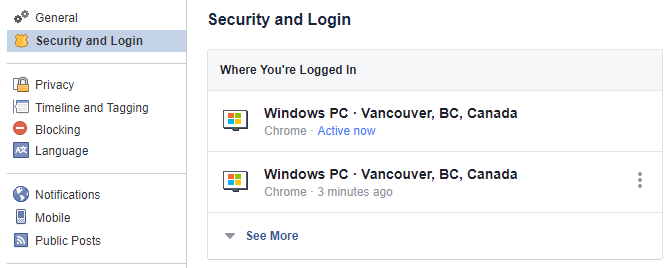
Will return all values as null (expect for id) if user hasn't been active since the session details functionality was implemented (sometime around 2020-06-11).
POST to /auth/disable-tfa/sms
from oo-auth-service.33b8fd75Disables Two Factor Authentication via SMS for the user. Will remove the sms from the user's two factor authentication methods.
POST to /auth/enable-tfa/sms
from oo-auth-service.33b8fd75Enables Two Factor Authentication via SMS for the user. Will send a SMS to the provided phone number with a code that the user needs to input to enable TFA. The code is valid for 10 minutes.
POST to /auth/refresh
from oo-auth-service.33b8fd75Gets a fresh access token by providing a refresh token.
POST to /auth/sms
from oo-sms-auth-service.6e7a7273 | Note: POST to /auth/token/smsVerify code and return auth tokens
POST to /auth/token
from oo-auth-service.33b8fd75Login for non web devices such as native mobile apps. Returns an access token to be used as bearer authentication. Response body also contains profile which has the same data as user-service.get-users-by-query with expand: "profile" but for the logged in user.
POST to /auth/verify-tfa/sms
from oo-auth-service.33b8fd75Verifies the Two Factor Authentication code sent to the user via SMS. Will return a Set-Cookie with the new session token if the code is correct. The code is valid for 10 minutes.
booked-consultant-ids
GET to /booked-consultant-ids
from oo-job-service.b016b808Get consultants that are booked on shifts or absent within a date range, with the calendar days they are busy on
candidate-account
DELETE to /candidate-account/:candidateId/contract
from oo-user-service.67cc1a03Deletes agreements for a candidate
GET to /candidate-account/:userId/history
from oo-user-service.67cc1a03Get recruitment history by candidate id
POST to /candidate-account/:id/send-contract
from oo-user-service.67cc1a03Sends employment contract to candidate
POST to /candidate-account/:userId/message
from oo-user-service.67cc1a03Send message to the candidate
POST to /candidate-account/bulk/message
from oo-user-service.67cc1a03Send message to multiple candidates in bulk
PUT to /candidate-account/:userId/recruit
from oo-user-service.67cc1a03Recruit a candidate as a consultant
PUT to /candidate-account/:userId/recruitment
from oo-user-service.67cc1a03Update recruitment details of the candidate
PUT to /candidate-account/bulk/recruitment
from oo-user-service.67cc1a03Update recruitment details of multiple candidates in bulk
collective-agreement
DELETE to /collective-agreement/:collectiveAgreementId
from oo-user-service.67cc1a03Delete a collective agreement by id
GET to /collective-agreement/:collectiveAgreementId
from oo-user-service.67cc1a03Get a collective agreement by id
POST to /collective-agreement/by-consultants
from oo-user-service.67cc1a03Get consultants using a specific collective agreement
PUT to /collective-agreement/:collectiveAgreementId
from oo-user-service.67cc1a03Update a collective agreement
consultant
GET to /consultant/:consultantId/guaranteed-hours
from oo-job-service.b016b808Get guaranteed hours progress for a consultant in a given month.
GET to /consultant/:consultantId/salary
from oo-job-service.b016b808This endpoint for show salary in the consultant view
GET to /consultant/:consultantId/salary_summary
from oo-job-service.b016b808This endpoint for get salary summary
consultant-account
DELETE to /consultant-account/:consultantId/contract
from oo-user-service.67cc1a03Deletes agreements for a consultant
DELETE to /consultant-account/:userId/absence/:absenceId
from oo-job-service.b016b808Delete consultant absence record
DELETE to /consultant-account/:userId/block
from oo-user-service.67cc1a03Unblock consultant for specific customer
DELETE to /consultant-account/:userId/rating/:ratingId
from oo-user-service.67cc1a03Delete a rating of a consultant
GET to /consultant-account/:userId/absence
from oo-job-service.b016b808Get consultant absence records
GET to /consultant-account/:userId/block
from oo-user-service.67cc1a03Get block customers for a consultant
GET to /consultant-account/:userId/generate-presentation
from oo-user-service.67cc1a03Generate a presentation for a consultant account
GET to /consultant-account/:userId/history
from oo-user-service.67cc1a03Get one page of the consultant event timeline, newest first. Internal users only.
POST to /consultant-account/:id/send-contract
from oo-user-service.67cc1a03Sends employment contract to consultant
POST to /consultant-account/:userId/absence
from oo-job-service.b016b808Add consultant absence record
POST to /consultant-account/:userId/block
from oo-user-service.67cc1a03Block consultant for specific customer
POST to /consultant-account/:userId/rating
from oo-user-service.67cc1a03Add a rating to a consultant
POST to /consultant-account/message
from oo-user-service.67cc1a03Send notifications to list of consultants
PUT to /consultant-account/:userId/absence/:absenceId
from oo-job-service.b016b808Update consultant absence record
PUT to /consultant-account/:userId/inactive
from oo-user-service.67cc1a03Deactivate consultant account
PUT to /consultant-account/:userId/password
from oo-user-service.67cc1a03Set password for consultant account directly (admin action)
consultant-account-sync-version
GET to /consultant-account-sync-version
from oo-user-service.67cc1a03Get the organisation's current consultant sync version. The counter is bumped on every consultant-mutating operation, so clients can poll it to detect stale consultant list caches. Returns 0 when no consultant write has been recorded yet.
contract
DELETE to /contract/:contractId/ob-rule/:ruleId
from oo-organisation-service.25f8f58fDelete a ob rule
GET to /contract/:contractId/ob-rule
from oo-organisation-service.25f8f58fGet ob rules for contract id
PUT to /contract/:contractId/ob-rule
from oo-organisation-service.25f8f58fBatch update, create, and delete OB rules for a contract
contract-signed-callback
POST to /contract-signed-callback
from oo-user-service.67cc1a03Handles webhook that is posted after employment contract was signed
corporate-group
DELETE to /corporate-group/:corporateGroupId
from oo-organisation-service.25f8f58fDelete a corporate group (koncern). Blocked while the group has member customers.
GET to /corporate-group/:corporateGroupId
from oo-organisation-service.25f8f58fGet a corporate group by id, including its member customers
POST to /corporate-group
from oo-organisation-service.25f8f58fCreate a corporate group (koncern). The group owns the invoice details shared by its member customers.
PUT to /corporate-group/:corporateGroupId
from oo-organisation-service.25f8f58fUpdate a corporate group (koncern). Changes to the invoice details apply to all member customers at read time.
customer
GET to /customer/:customerId/competences
from oo-organisation-service.25f8f58fGet latest contract version competences by customer id, will filter away hidden ones if logged in as customer
GET to /customer/:customerId/history
from oo-organisation-service.25f8f58fGet one page of the customer event timeline, newest first. Internal users only.
GET to /customer/:customerId/terms
from oo-organisation-service.25f8f58fGet latest contract version terms by customer id
GET to /customer/:id/duplicates
from oo-organisation-service.25f8f58fFind any potential duplicate customers based on address, is used when activating a new customer
POST to /customer/:customerId/price
from oo-organisation-service.25f8f58fGet price for given competences with customer id
customer-account
DELETE to /customer-account/:userId
from oo-user-service.67cc1a03 | Note: Please use DELETE to /user/:userIdDelete a customer account
GET to /customer-account/:userId/customer
from oo-user-service.67cc1a03Get customers by customer user id
PUT to /customer-account/:userId/:customerId/notification-settings
from oo-user-service.67cc1a03Update a customer account
PUT to /customer-account/:userId/password
from oo-user-service.67cc1a03Set password for customer account directly (admin action)
customer-sync-version
GET to /customer-sync-version
from oo-organisation-service.25f8f58fGet the organisation's current customer sync version — a monotonic counter bumped on every customer write. Poll it to decide whether a cached customer list is stale. Returns 0 if no customer write has happened yet.
dashboard
POST to /dashboard/refresh-cache
from oo-report-service.a25f66deManually trigger a rebuild of the dashboard cache for the authenticated user's organisation only.
document
GET to /document
from oo-user-service.67cc1a03Get a list of documents with pagination, sorting, and filtering
file-service
POST to /file-service/upload
from file-service.8acf071cUploads a file. Uses multipart data with the file to be uploaded as a form field called 'file'. Max file size is 20 mb. Returns status code 201 on success.
PUT to /file-service/image/:imageName
from file-service.8acf071cUpdates image width, height and/or rotation. Will process images and save in S3.
fortnox
GET to /fortnox/activate
from oo-fortnox-service.52083764Activates fortnox integration for the logged in users organisation. This is a one-off operation required to allow Origo to access the clients Fortnox account.
GET to /fortnox/redirect
from oo-fortnox-service.52083764Handles redirect from Fortnox after app was added
POST to /fortnox/test
from oo-fortnox-service.52083764Will test the fortnox integration by invoking the Fortnox API, will only perform read operations that are safe.
invitation
GET to /invitation
from oo-job-service.b016b808Returns list of job invitations for logged in consultant
PUT to /invitation/:token
from oo-user-service.67cc1a03Update a user account by using an invitation token. This is a public endpoint that is used when onboarding new users by sending out invitations.
invoice
GET to /invoice/:invoiceNum/download
from oo-fortnox-service.52083764Downloads a PDF invoice by creating a 'preview' in Fortnox
POST to /invoice/:invoiceId/credit
from oo-job-service.b016b808Credits invoice (so far only available for organisations using Fortnox as invoicing system)
invoice-batch
POST to /invoice-batch/count
from oo-job-service.b016b808Count customers and time reports that an invoice batch would include, without creating one
PUT to /invoice-batch/:invoiceBatchId/invoice/:invoiceId
from oo-job-service.b016b808Toggles if invoice should be included in invoice batch
job
DELETE to /job/:jobId/application/:applicationId
from oo-job-service.b016b808Hard-delete a job application so the consultant can re-apply
GET to /job/:jobId/confirmation/consultant/:consultantId
from oo-job-service.b016b808Download job confirmation for consultant
GET to /job/:jobId/confirmation/customer
from oo-job-service.b016b808Download job confirmation for customer
GET to /job/:jobId/history
from oo-job-service.b016b808Get the unified event timeline for a job (job history + time report milestones), newest first. Internal users only.
POST to /job/:jobId/book
from oo-job-service.b016b808Book consultant for specific job, optionally on an explicit set of its available shifts
POST to /job/:jobId/deny
from oo-job-service.b016b808Decline job if job has not matching consultants
POST to /job/:jobId/invitation
from oo-job-service.b016b808Create job invitation to consultant by customer user
POST to /job/:jobId/invitation/:invitationId/accept
from oo-job-service.b016b808Accept an invitation as logged in consultant
POST to /job/:jobId/invitation/:invitationId/decline
from oo-job-service.b016b808Decline invitation by consultant
POST to /job/:jobId/reopen
from oo-job-service.b016b808Reopens job that was previously cancelled or denied
POST to /job/:jobId/send-notification-to-matches
from oo-job-service.b016b808Send notification to matching consultant
PUT to /job/:jobId/application/:applicationId
from oo-job-service.b016b808Update job application status
PUT to /job/:jobId/shift
from oo-job-service.b016b808Update shift for a job. This endpoint is only for customer users.
PUT to /job/:jobId/shift_status
from oo-job-service.b016b808Change the status of extended required shifts
job-report
GET to /job-report/:jobReportId/:token
from oo-job-service.b016b808Get job report by id and token (public endpoint)
PUT to /job-report/:jobReportId/:token
from oo-job-service.b016b808Update job report by id (public endpoint)
knowledge-base-article
DELETE to /knowledge-base-article/:articleId
from oo-organisation-service.25f8f58fDelete a knowledge base article (requires knowledge-base.delete permission)
GET to /knowledge-base-article/:articleId
from oo-organisation-service.25f8f58fGet a knowledge base article by id
POST to /knowledge-base-article
from oo-organisation-service.25f8f58fCreate a knowledge base article (requires knowledge-base.create permission)
POST to /knowledge-base-article/:articleId/feedback
from oo-organisation-service.25f8f58fRecord feedback (thumbs up/down) for a knowledge base article (requires knowledge-base.feedback permission)
PUT to /knowledge-base-article/:articleId
from oo-organisation-service.25f8f58fUpdate a knowledge base article (requires knowledge-base.update permission)
knowledge-base-articles
GET to /knowledge-base-articles
from oo-organisation-service.25f8f58fGet knowledge base articles by tags (comma-separated). Returns all articles if no tags provided.
me
PUT to /me/preferences
from oo-user-service.67cc1a03Update the authenticated user's own preferences (merged into profile.preferences)
notification
DELETE to /notification/:notificationId
from oo-notification-service.6db952a0Delete notification by id
PUT to /notification/read
from oo-notification-service.6db952a0Read bulk notifications of the auth user
notifications
POST to /notifications/register
from oo-push-service.15767e71Register a FIREBASE device token (aka registrationToken) and user id.
- Example of device token:
APA91bHUyC8pJNmnEjkDeoeKKjo_i5IXQZef0VkG8aLy3ViYsgY0tuCY4gLGSKsTUuZRWWXyhFscDo-UogugDPfTT04yhPJVR_ELHvGowYXu49c9gvDG7WpUamgvCebLhWppHn8LoLa3H1FbeV6xNSdXh5rl7rABSw
POST to /notifications/unregister
from oo-push-service.15767e71Unregisters either a FIREBASE device token (aka "registrationToken") or user id.
- If `registrationToken` is used, all users with that registrationToken are removed from push.
- If `userId` (logged in user) is used, all registrationTokens (devices) for that user will be removed from push.organisation
DELETE to /organisation/:orgId/tag-type/:taxonomy/:key
from oo-organisation-service.25f8f58fDelete a tag type and cascade delete the tag from every entity carrying it. Consultant tag types used as requirements on active jobs cannot be deleted.
GET to /organisation/:orgId/competences
from oo-organisation-service.25f8f58fGet competences by organisation id. Archived competences are excluded unless includeArchived=true
GET to /organisation/:orgId/notification-settings
from oo-notification-service.6db952a0Get notification templates and settings by organisation id
GET to /organisation/:orgId/notification-templates
from oo-notification-service.6db952a0Get notification templates by organisation id
POST to /organisation/:orgId/tag-type/:taxonomy
from oo-organisation-service.25f8f58fCreate a tag type in one of the organisation's tag taxonomies. If key is omitted it is slugified from name.sv.
POST to /organisation/:orgId/template
from oo-notification-service.6db952a0Creates a new notification template
POST to /organisation/:orgId/template/:templateId/test
from oo-notification-service.6db952a0Send a test notification to a specified user using a template
PUT to /organisation/:orgId/competence
from oo-organisation-service.25f8f58fUpdate an organisation's competence tree: rename, archive/restore or add a competence. Competences are archived rather than deleted so existing jobs keep working.
PUT to /organisation/:orgId/tag-type/:taxonomy/:key
from oo-organisation-service.25f8f58fUpdate a tag type (name, and validityDuration for the consultant taxonomy). Renames propagate automatically since entities store only the key.
PUT to /organisation/:orgId/template/:id
from oo-notification-service.6db952a0Updates a single notification template
organisation-account
GET to /organisation-account
from oo-user-service.67cc1a03Get all organisation accounts (internal users)
POST to /organisation-account/:userId/transfer-consultants
from oo-user-service.67cc1a03Transfer all consultants from one manager to another within an organisation
origo
POST to /origo/reset-password
from oo-user-service.67cc1a03Public endpoint to request password reset. Will take users role into account and use different templates depending on it.
report
GET to /report/download
from oo-fruster-report-service.af3aa709Download report file. Only available if EXPOSE_DOWNLOAD is enabled.
reset-password
GET to /reset-password/:token
from oo-password-reset.3aeed82cGets whether or not the provided token is still valid for resetting password. Typically used to display a warning to the user before posting new password that the token is invalid.
POST to /reset-password
from oo-password-reset.3aeed82cRequests a password reset to by providing a username. Username is configured to be: email.
PUT to /reset-password
from oo-password-reset.3aeed82cReset user's password with token from password reset-email.
salary-batch
GET to /salary-batch/hogia/export-url
from oo-hogia-hr-service.765c9618Generates a signed URL to export ZIP
POST to /salary-batch
from oo-job-service.b016b808Create a salary batch as preview for provided period, optionally scoped to a selection of consultants
PUT to /salary-batch/:salaryBatchId/consultant
from oo-job-service.b016b808Modify included consultants in the salary batch
schedule
GET to /schedule/consultant
from oo-job-service.b016b808Get consultant schedule in given date range.
GET to /schedule/consultant-old
from oo-job-service.b016b808 | Note: Use - GET to /schedule/consultantGet consultant schedule
stats
GET to /stats/job/excel
from oo-job-service.b016b808 | Note: Use https://oo-api-doc.test-1.fruster.se/#GET-to-/report/customer-job-statsGet statistics of jobs excel
subsidiary
DELETE to /subsidiary/:subsidiaryId
from oo-organisation-service.25f8f58fDelete a subsidiary (dotterbolag). Blocked while consultants or customers belong to it.
GET to /subsidiary
from oo-organisation-service.25f8f58fGet subsidiary list (recruitmentContract omitted)
POST to /subsidiary
from oo-organisation-service.25f8f58fCreate a subsidiary (dotterbolag). Its identity, recruitmentContract and pools override the parent organisation's values.
PUT to /subsidiary/:subsidiaryId
from oo-organisation-service.25f8f58fUpdate a subsidiary (dotterbolag).
time-report
POST to /time-report/publish
from oo-job-service.b016b808Publishes time reports to customer users. This can either be done by providing id's of time reports to publish or by providing pool in which all time reports that are already attested by admin will be published.
PUT to /time-report/:entryId
from oo-job-service.b016b808<p>Update time report by id. NOTE: all user roles use this endpoint to update time reports.</p><p>State sequence. PENDING => NOTWORKED,WORKED => ATTESTEDBYADMIN => ATTESTEDBYCUSTOMER, DECLINEDBYCUSTOMER </p><p>Admin can handle all status. But need to do it in sequence</p><p>Customer can ATTESTEDBYCUSTOMER and DECLINEDBYCUSTOMER. A comment need when decline. Admin will RESOLVEDDECLINEBYADMIN declined time reports </p><p>Consultant can WORKED or NOT_WORKED</p>
PUT to /time-report/:entryId/undo
from oo-job-service.b016b808Undo time report to previous state. NOTE: Only undo what auth user did. But admin can undo every.
user
GET to /user/:userId/contact-summary
from oo-user-service.67cc1a03Get contact information to user no mater of role. Is primarily used when need to get contact information from a user id. Only used by dashboard users.
POST to /user/resend-verification/:email
from oo-fruster-user-service.ed91b8f9Generates a new email verification token and resends email w/ token to the provided user. Response has status code 200 if successful.
POST to /user/verify/:tokenId
from oo-fruster-user-service.ed91b8f9Verifies a user's email address by providing a token sent to the user by email. Response has status code 200 if successful.
PUT to /user/update-password
from oo-fruster-user-service.ed91b8f9Updates password of auth user's account. Requires to validation of old password before new can be set. Response has status code 202 if successful.
Ws endpoints
out
ws.out.:userId.>
from oo-api-gateway.8a0147e8Sends a message to a client (user) via websocket, if such connection exists. The message is sent to a userId with a label (in place of the >). If sent to ws.out.e3bcf884-8b49-46ae-8546-8dcc65b56932.new-notification (The label being new-notification) the user will receive the message in the handler registered to new-notification. Can be used to send a global message to all connected users by providing a * as userId. To specify a list of users to send to * is used as userId and req.to is set to an array of userIds.
public
ws.out.public.>
from oo-api-gateway.8a0147e8Sends a message to all connected users. Public and non public connections. The > is the label for the message being sent. E.g. ws.out.public.psa (Where the label is psa). This endpoint will make it possible for the public clients to subscribe to the endpoint without knowing their assigned uuid.
Service endpoints
auth-service
|auth-service.generate-jwt-token-for-user.app
from oo-auth-service.33b8fd75 | Note: Use auth-service.generate-jwt-token-for-user.token insteadauth-service.generate-jwt-token-for-user.token
from oo-auth-service.33b8fd75Generates a web JWT token for a user matching the inputted Mongo query. Used for external logins.
auth-service.generate-jwt-token-for-user.web
from oo-auth-service.33b8fd75 | Note: Use auth-service.generate-jwt-token-for-user.cookie insteadauth-service.get-session-details-by-user-id
from oo-auth-service.33b8fd75Gets session details for a user. Will return all values as null if user hasn't been active since the session details functionality was implemented (sometime around 2020-06-11).
auth-service.logout-users-by-id
from oo-auth-service.33b8fd75Logs out a list of users. Does not matter if user is logged in via cookie or token.
auth-service.refresh-token
from oo-auth-service.33b8fd75Gets a fresh access token by providing a refresh token.
file-service
|file-service.get-signed-url
from file-service.8acf071cGets an temporary url to a file that will expire after provided or default TTL
file-service.is-processing-completed
from file-service.8acf071cCheck whether the video file processing is completed or not
fruster-web-bus
|fruster-web-bus.unregister-client
from oo-api-gateway.8a0147e8Request to (forcefully) unregister (a) websocket client. Can be done by either providing the jwt-token to unregister one connection or the id of the user to unregister all connections for user.
mail-service
|mail-service.process-grouped-mail-timeouts
from oo-mail-service.d2eeab33To be used by schedule service. Checks for timed out grouped mails. If any is timeout; The pending mails are sent out as one mail and the batch is decreased (Until 0 and then removed).
mail-service.send-grouped-mail
from oo-mail-service.d2eeab33Sends a mail that can be grouped.
mails sent using this endpoint will be sent in groups, based off the GROUPED_MAIL_BATCHES config.
mails are grouped by email (taken from the to array) and key.
When used with multiple `email`s in the `to` array, each `email` is grouped individually.
The grouping of mails happens in batches.
Each batch “level” has a `numberOfMessages` (Number of messages before next batch level is reached)
and `timeout` (timeout before level is decreased) defined.
Every time a batch level's `numberOfMessages` is reached, the pending mails are sent out as one mail
and the batch level is increased. Each new batch level will (most commonly) increase `numberOfMessages`
and the `timeout`. If the number of messages is not fulfilled before the timeout is reached,
the mail is sent with all pending grouped mails; then the batch level is decreased.
When a grouped mail is sent out; any `{{n}}` in message and/or title will be replaced
by the number of pending grouped mails at that point. When using templates,
`n` will be added to `templateArgs` and can then be used by the template.
Example: When 56 grouped mails with the key `message-service.NEW_MESSAGE` have been sent w/
the message `You have {{n}}}} new messages!` it becomes:
You have 56 new messages!
Current configuration:
Batch level 1 => numberOfMessages: 1, timeout: 0ms
Batch level 2 => numberOfMessages: 5, timeout: 2m
Batch level 3 => numberOfMessages: 30, timeout: 5m
With this configuration after 36
mails being sent, the email would have received 3 mails;
granted none of the timeouts have been reached.mail-service.send-mail
from oo-mail-service.d2eeab33Sends a mail to one or more mails (emails) addresses
oo-fortnox-service
|oo-fortnox-service.credit-invoice
from oo-fortnox-service.52083764Creates a credit invoice for invoice with provided invoice number. Note that invoice must be book kept (in Fortnox) prior to creating a credit invoice.
oo-fortnox-service.delete-salaries
from oo-fortnox-service.52083764Removes salary transactions in Fortnox, use with caution! This will only remove the transactions in Fortnox, not the salary batch job in our system.
oo-fortnox-service.process-invoices
from oo-fortnox-service.52083764Creates invoices for provided invoice batch
oo-fortnox-service.process-invoices.completed
from oo-job-service.b016b808Updates an InvoiceBatch when oo-fortnox-service finishes processing it
oo-fortnox-service.process-salaries
from oo-fortnox-service.52083764Creates salaries for provided salary batch
oo-fortnox-service.reconcile-stuck-invoice-batch-jobs
from oo-fortnox-service.52083764Reconciles invoice batch jobs stuck in PROCESSING against Fortnox. Triggered on a cron.
oo-hogia-hr-service
|oo-hogia-hr-service.create-salary-export
from oo-hogia-hr-service.765c9618Create Hogia salary export file(s) for provided salary batch
oo-job-service
|oo-job-service.archive
from oo-job-service.b016b808Archive jobs and applications after 3 month after its last shift, archive job reports after 6 month
oo-job-service.create-job-reports
from oo-job-service.b016b808Create job reports when last shift of the iso week has ended
oo-job-service.doctor
from oo-job-service.b016b808Performs checks on data in job service, is used to catch inconsistencies in data, should be invoked once every day
oo-job-service.get-active-jobs
from oo-job-service.b016b808Get active jobs for given query (consultant and customer)
oo-job-service.get-applications-by-user
from oo-job-service.b016b808Get applications by consultant id
oo-job-service.get-booked-shifts-by-consultants
from oo-job-service.b016b808Get booked shifts (from ACCEPTED applications) for multiple consultants within a date range, grouped by consultant
oo-job-service.get-requirement-tag-usage
from oo-job-service.b016b808Counts the organisation's active jobs (OPEN, BOOKED, BOOKEDWITHUNMANNED_SHIFTS) whose requirements.tags contain the given consultant tag key.
oo-job-service.get-salary-preview
from oo-job-service.b016b808 | Note:Calculates a preview of consultant salary. Will perform calculations but not actually make any changes.
This is useful so i.e. consultants can get a hunch of the salary he/she will get or it can be used in reports.
Note that this should **NOT** be mistaken with PreviewSalaryBatch which is something else.oo-job-service.send-shift-finished-notification
from oo-job-service.b016b808Send a push notification to the consultants after shift end
oo-job-service.send-shift-start-reminder
from oo-job-service.b016b808Send a push notification to the consultants to reminder about that shift starts in ~1 hour
oo-job-service.send-time_report-reminder-notification
from oo-job-service.b016b808Send a push notification to the consultants to reminder about time report
oo-job-service.silent-attest
from oo-job-service.b016b808Auto attest time reports which are still not attested by customer
oo-job-service.strip-job-tag
from oo-job-service.b016b808Strips a descriptive job tag (jobTagTypes key) from all jobs of an organisation. Used as the cross-service cascade when the tag type is deleted. Idempotent.
oo-job-service.strip-requirement-tag
from oo-job-service.b016b808Strips a consultant tag (consultantTagTypes key) from the requirements.tags of all jobs of an organisation. Used as the cross-service cascade when the tag type is deleted. Idempotent.
oo-notification-service
|oo-notification-service.create-notification
from oo-notification-service.6db952a0Create notification
oo-notification-service.get-template-by-name
from oo-notification-service.6db952a0Get a single notification template by organisation id and template name
oo-notification-service.settings
from oo-notification-service.6db952a0Get notification templates and settings by organisation id
oo-organisation-service
|oo-organisation-service.add-customer-history
from oo-organisation-service.25f8f58fRecord a customer timeline event on behalf of another service. Used for customer users, which live in oo-user-service.
oo-organisation-service.get-customer-by-id
from oo-organisation-service.25f8f58fGet an customer by id
oo-organisation-service.get-customers-by-query
from oo-organisation-service.25f8f58fGet customers by query
oo-organisation-service.get-ob-dates
from oo-organisation-service.25f8f58fGet ob dates for given contracts and given date range
oo-organisation-service.get-ob-dates-by-contracts
from oo-organisation-service.25f8f58fGet ob dates for given contract ids and a single date range
oo-organisation-service.get-organisation-by-id
from oo-organisation-service.25f8f58fGet an organisation by id
oo-organisation-service.get-organisations-by-query
from oo-organisation-service.25f8f58fGet organisations by query
oo-organisation-service.get-price
from oo-organisation-service.25f8f58fGet price for given competences with customer id
oo-organisation-service.get-prices-by-contracts
from oo-organisation-service.25f8f58fGet price for given competences with contract
oo-organisation-service.getObRulesByContracts
from oo-organisation-service.25f8f58fGet OB rules by contract IDs for salary calculation
oo-report-service
|oo-report-service.refresh-dashboard-cache
from oo-report-service.a25f66deRefresh dashboard cache for all organizations
oo-user-service
|oo-user-service.bulk-invite-users
from oo-user-service.67cc1a03Bulk invite multiple users by their IDs
oo-user-service.get-all-blocked-consultants
from oo-user-service.67cc1a03Get all blocked consultants
oo-user-service.get-auth-user
from oo-user-service.67cc1a03Get active and non delete auth user details for auth service
oo-user-service.get-block-consultants
from oo-user-service.67cc1a03Get block consultants by a customer
oo-user-service.get-block-customers
from oo-user-service.67cc1a03Get block customers for a consultant
oo-user-service.get-collective-agreement-by-id
from oo-user-service.67cc1a03Get a collective agreement by id
oo-user-service.get-consultants-by-collective-agreement
from oo-user-service.67cc1a03Get consultants using a specific collective agreement
oo-user-service.get-consultants-by-query
from oo-user-service.67cc1a03Get consultants by MongoDB query with flexible filtering, pagination, and sorting
oo-user-service.send-certification-expiry-reminders
from oo-user-service.67cc1a03Sends push reminders to consultants whose certifications expire soon, for certification types with reminders enabled. Idempotent sweep triggered by scheduled job.
oo-user-service.send-set-password-mail
from oo-user-service.67cc1a03Send set password mail after activation of the customer
oo-user-service.strip-consultant-tag
from oo-user-service.67cc1a03Removes a consultant tag (by key) from all consultants of an organisation. Idempotent sweep used by the consultant-tag-type cascade delete.
oo-user-service.update-consultant
from oo-user-service.67cc1a03Update a consultant account via service
oo-user-service.update-consultant-location
from oo-user-service.67cc1a03Update consultant's location by their postal code
oo-user-service.update-search-text
from oo-user-service.67cc1a03Update search text for every users. This use by schedule
password-reset-service
|password-reset-service.generate-password-reset
from oo-password-reset.3aeed82cWorks much like the password-reset-service.request-password-reset endpoint but does not send email and returns token in response. Username is configured to be: email
password-reset-service.get-password-reset
from oo-password-reset.3aeed82cGets whether or not the provided token is still valid for resetting password. Typically used to display a warning to the user before posting new password that the token is invalid.
password-reset-service.request-password-reset
from oo-password-reset.3aeed82cRequests a password reset to by providing a username. Username is configured to be: email.
password-reset-service.reset-password
from oo-password-reset.3aeed82cReset user's password with token from password reset-email.
push-service
|push-service.process-grouped-notification-timeouts
from oo-push-service.15767e71To be used by schedule service. Checks for timed out grouped notifications. If any is timedout; The pending notifications are sent out as one push and the batch is decreased (Until 0 and then removed).
push-service.send
from oo-push-service.15767e71 | Note: Use push-service.send-notification instead.Sends a push notification to one or many users.
push-service.send-grouped-notification
from oo-push-service.15767e71Sends a notification that can be grouped. Notifications sent using this endpoint will be sent in groups, based off the GROUPED_NOTIFICATION_BATCHES config.
Notifications are grouped by userId (taken from the to array) and key. When used with multiple userIds in the to array, each userId is grouped individually.
The grouping of notifications happens in batches. Each batch “level” has a numberOfMessages (Number of messages before next batch level is reached) and timeout (timeout before level is decreased) defined. Every time a batch level's numberOfMessages is reached, the pending notifications are sent out as one push and the batch level is increased. Each new batch level will (most commonly) increase numberOfMessages and the timeout. If the number of messages is not fulfilled before the timeout is reached, the push is sent with all pending grouped notifications; then the batch level is decreased.
When a grouped notification is sent out; any {{n}} will be replaced by the number of pending grouped notifications at that point. Example: When 56 grouped notifications with the key message-service.NEW_MESSAGE have been sent w/ the body You have {{n}}}} new messages! it becomes:
You have 56 new messages!Current configuration:
Batch level 1 => numberOfMessages: 1, timeout: 0ms
Batch level 2 => numberOfMessages: 5, timeout: 15mWith this configuration after 6 notifications being sent, the user would have received 2 pushes; granted none of the timeouts have been reached.
push-service.send-notification
from oo-push-service.15767e71Sends a push notification to one or many users.
push-service.unregister
from oo-push-service.15767e71Unregisters all registrationTokens (devices) for the provided user.
report-service
|report-service.create-report
from oo-fruster-report-service.af3aa709A service that accepts JSON (in) and outputs reports in different formats.
schedule-service
|schedule-service.create-job
from oo-schedule-service.31d3274aCreates or updates (upserts) a new job that runs on a given interval or time. Read more about fruster-schedule-service.
sms-service
|sms-service.send-sms
from oo-sms-service.b0bc6897Sends an sms to one or more phone numbers using 46ELKS's sms framework
user-service
|user-service.add-roles
from oo-fruster-user-service.ed91b8f9Adds inputted roles to specified user. Can only add roles existing in configuration. Response has status code 202 if successful.
user-service.availability-reminder
from oo-user-service.67cc1a03Sends reminders to consultants to update their availability
user-service.create-user
from oo-fruster-user-service.ed91b8f9Creates a fruster user. Must include a few base fields but can contain any number of custom fields. Response has status code 201 if successful. Automatically splits data between user and profile if configured to.
user-service.delete-user
from oo-fruster-user-service.ed91b8f9Deletes a user. Response has status code 200 if successful. pub.user-service.user-deleted is published after deletion
user-service.delete-users-by-query
from oo-fruster-user-service.ed91b8f9Deletes users by a query. Response has status code 200 if successful. pub.user-service.user-deleted is published after deletion. Request body is the query to delete with. Cannot use empty query.
user-service.get-by-aggregate
from oo-fruster-user-service.ed91b8f9Gets user records by aggregate without process aggregate result
user-service.get-scopes
from oo-fruster-user-service.ed91b8f9Gets all scopes for specified roles in a flat array. E.g. input ['admin', 'user', 'super-admin'] would return ['', 'admin.', 'profile.get']. Response has status code 200 if successful.
user-service.get-user
from oo-fruster-user-service.ed91b8f9 | Note: Use user-service.get-users-by-query instead.Gets users by query. Response has status code 200 if successful.
user-service.get-users-by-aggregate
from oo-fruster-user-service.ed91b8f9Gets users by aggregate. The result process with view model
user-service.get-users-by-query
from oo-fruster-user-service.ed91b8f9Gets users by query. Note: Return data may vary depending on the configuration. Configured user fields: ALL (Will always return id,email,password,roles,scopes)
Can be expanded to return both user and profile data using expand: "profile" if configured to split the data. If expand is used; the query can be used to query profile fields as well: { "profile.firstName": "Bob" }. With expand; the data is returned {...userData, profile: {...profileData}}. Can fetch only user count without users, using count: true. if count is used returns totalCount with empty users array
user-service.remove-roles
from oo-fruster-user-service.ed91b8f9Removes inputted roles from specified user. Cannot remove the last role. Response has status code 202 if successful.
user-service.resend-verification
from oo-fruster-user-service.ed91b8f9Generates a new email verification token and resends email w/ token to the provided user. Response has status code 200 if successful.
user-service.set-password
from oo-fruster-user-service.ed91b8f9Sets password of a user. Used by password reset service. Note: Updating a user's password should be done w/ the update-password endpoint. Response has status code 202 if successful.
user-service.update-password
from oo-fruster-user-service.ed91b8f9Updates password of an account. Requires to validation of old password before new can be set. Response has status code 202 if successful.
user-service.update-user
from oo-fruster-user-service.ed91b8f9Updates a user. Can contain any number of custom fields. Response has status code 200 if successful.
user-service.validate-password
from oo-fruster-user-service.ed91b8f9Validates that inputted password becomes the same hash as for an account. Typically used by auth service for login. Response has status code 200 if successful. Validation can be done on email
user-service.verify-email
from oo-fruster-user-service.ed91b8f9Verifies a user's email address by providing a token sent to the user by email. Response has status code 200 if successful.